 ArticleAudio
Listen to Medium Articles
Turn long-form Medium content into natural audio. Perfect for learning on the go, reducing screen time, or finally clearing your reading list.
 Add to Chrome - It's Free
 1,000 words free. No credit card required.
How it works
Step 1 — Select text
Highlight the paragraphs of the Medium article you want to listen to.
Step 2 — Listen
Use any of these options to start listening:
Option 1
Play button
Appears near your selected text when you highlight 30+ words
Option 2
Keyboard shortcut
 shift +
  tab
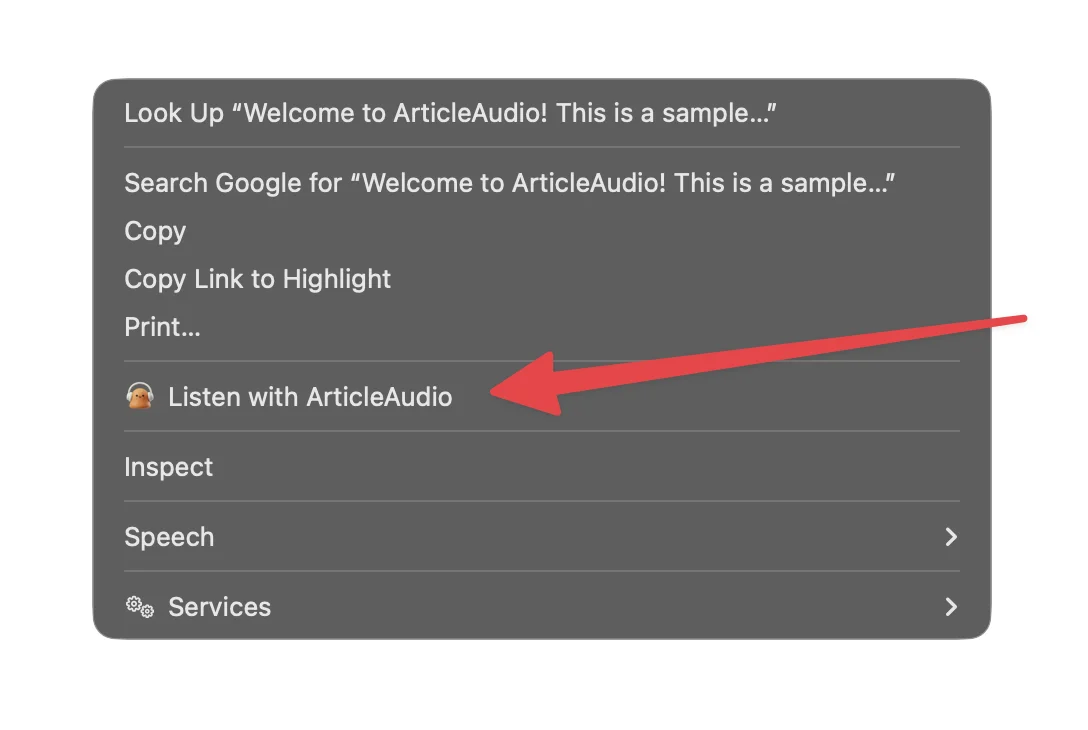
tabOption 3
Right-click menu
The Problem with Reading on Medium
Great content, but not always convenient to read
Long articles cause eye strain
Medium is known for long-form content. Reading 15-minute articles on a screen can be exhausting, especially after a day of work.
No built-in audio option
Unlike some platforms, Medium doesn't offer text-to-speech. You're stuck reading every word yourself.
Hard to read on mobile
Small screens make long reads uncomfortable. Scrolling through thousands of words on your phone isn't ideal.
Great content, no time to read
Your reading list keeps growing, but finding time to sit down and read feels impossible.
How ArticleAudio Helps
Turn any Medium content into natural-sounding audio
Convert any article to audio
Turn any Medium article into natural-sounding speech. Just highlight the text, press Shift+Tab, and listen.
Works with paywalled content
If you're a Medium member and can see the article, ArticleAudio can read it. We read what's on your screen.
Listen on the go
Turn your commute, workout, or chores into learning time. Consume articles without being glued to a screen.
Adjustable playback speed
Speed up to 2x for quick consumption or slow down for complex topics. Full control over your listening experience.
Perfect For
Listen to Medium content in situations where reading isn't practical
Frequently Asked Questions
Does ArticleAudio work with all Medium articles?
Yes! ArticleAudio works on any webpage, including all Medium articles. Whether it's a free post or member-only content you have access to, just highlight and listen.
Can I listen to paywalled Medium articles?
If you're a Medium member and can see the full article in your browser, ArticleAudio can read it aloud. We don't bypass paywalls - we simply read the content visible on your screen.
How does this compare to screen readers?
Traditional screen readers use robotic voices that can be tiring for long content. ArticleAudio uses modern AI voices that sound natural and are optimized for extended listening.
Can I listen to my entire reading list?
Absolutely. Open any article, highlight the content (or select all), and start listening. It's a great way to finally clear that backlog of saved articles.
What about code snippets in technical articles?
ArticleAudio reads text content naturally. For articles with code, you might want to skip code blocks by selecting just the explanatory text. The voice handles technical content well.
Is there a limit on article length?
The free tier includes 1,000 words. For unlimited listening to long-form Medium content, our premium plan at $6/month is a great value.
Start listening today
Install ArticleAudio and transform how you consume content on the web
 Add to Edge
  Add to Firefox
  Add to Opera