 ArticleAudio
Listen to CNN Articles
Turn CNN news articles into natural audio. Keep up with breaking news and analysis hands-free — during your commute, workout, or whenever you're on the move.
 Add to Chrome - It's Free
 1,000 words free. No credit card required.
How it works
Step 1 — Select text
Highlight the paragraphs of the CNN article you want to listen to.
Step 2 — Listen
Use any of these options to start listening:
Option 1
Play button
Appears near your selected text when you highlight 30+ words
Option 2
Keyboard shortcut
 shift +
  tab
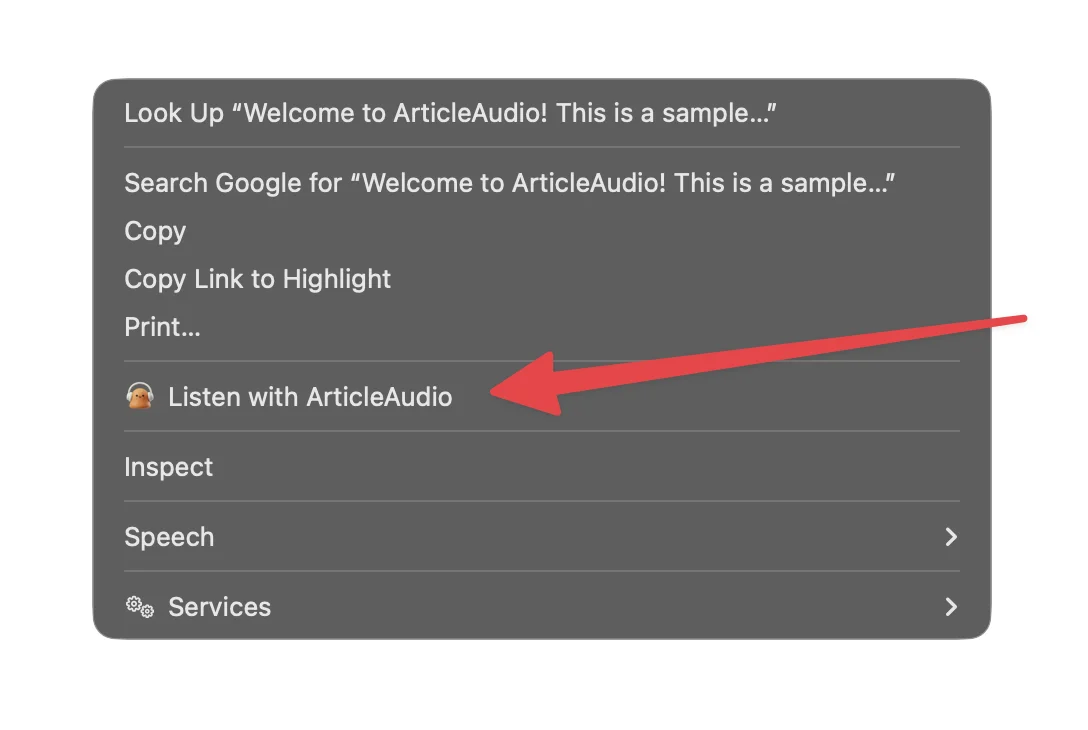
tabOption 3
Right-click menu
The Problem with Reading on CNN
Great content, but not always convenient to read
Too many articles, not enough time
CNN publishes dozens of articles a day. Keeping up by reading every story is exhausting — there has to be a better way.
No text-to-speech for written articles
CNN has video content, but most articles don't have a listen option. You have to read every word or skip the story entirely.
News consumption tied to your screen
Whether it's breaking news or in-depth analysis, reading CNN means staring at a screen. That's not always convenient or comfortable.
Eye strain from all-day screen time
After a day of work on a computer, reading more text in the evening takes a toll on your eyes and focus.
How ArticleAudio Helps
Turn any CNN content into natural-sounding audio
Listen to any CNN article instantly
Turn any CNN article into natural-sounding speech. Highlight the text, press Shift+Tab, and listen — no app switching required.
Catch up on news hands-free
Listen to CNN coverage during your commute, at the gym, or while making dinner. Stay informed without being tied to your screen.
Natural AI voices
ArticleAudio uses modern AI voices that sound natural and are easy to listen to for extended periods — not robotic TTS.
Control your listening speed
Speed through breaking news at 1.5x or slow down for complex analysis. You're in full control of the pace.
Perfect For
Listen to CNN content in situations where reading isn't practical
Frequently Asked Questions
Does ArticleAudio work with CNN articles?
Yes! ArticleAudio works on any webpage including all CNN articles. Highlight the text you want to hear, press Shift+Tab, and start listening immediately.
Does it work with CNN opinion pieces and long-form features?
Absolutely. It works on all text-based CNN content — breaking news, opinion, analysis, politics, business, entertainment, and more.
Can I listen while doing something else?
Yes. Once you start playback, you can minimize the browser or switch tabs. ArticleAudio will keep reading in the background.
How is this different from CNN's own video content?
CNN video is great, but most written articles don't have a video equivalent. ArticleAudio lets you listen to any article, including those that will never get a video treatment.
Do I need a CNN account or subscription?
No. ArticleAudio reads whatever is visible on your screen. If you can see the article, it can read it — no special access required.
Is there a word limit?
The free tier includes 1,000 words. For unlimited listening to all the CNN content you want, our premium plan is $6/month.
Start listening today
Install ArticleAudio and transform how you consume content on the web
 Add to Edge
  Add to Firefox
  Add to Opera